
In the reconciliation section of your account, you can view a full list of all tracked conversions from your program by month. You will see the commission status by publisher and you can choose to hold, deny, or approve payments.
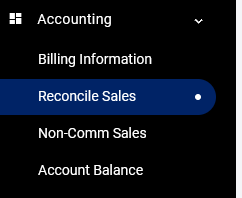
Once you log into your account, go to Accounting > Reconcile Sales:
You will see the current month by default. To see past months, click the drop-down menu for Month.

If you would like to change all transactions from a specific publisher, click the pencil icon in the Actions column.
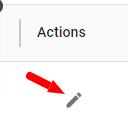
If you would like to reject all conversions from a specific publisher, click the pencil icon the Actions column and select Deny All.
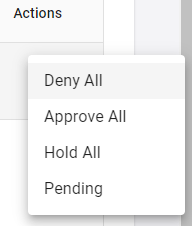
If you want to keep conversions in Pending status from a specific publisher (to review at a later time), click Hold All.
Please note, sales that are placed on hold are automatically moved to the following month. If you believe you can confirm the validity of a sale before the 15th, we recommend delaying setting the Hold status as it cannot be undone.
To review or edit each individual conversion from a publisher, click View More in the left column.

All reconciliations should be done before the 15th of every month. Unreconciled records will automatically be Approved after the reconciliation period ends.
Bulk Reconcile
You may reconcile tracked orders in bulk by clicking the Bulk Reconcile button.

This feature helps you reconcile sales against applications you may already be using to manage your sales and orders. In order to use bulk reconciliation, each sale that is capture by your tracking integration placement on your website/store must be using the UID parameter and must be set to be your sales’ unique order number/id.
Step 1 – Click the “Download Template” button to download your spreadsheet.
Step 2 – In the “Submitting As” column, approve, hold or deny each sale using numbers:
- Approve = 1
- Hold = 2
- Deny = 0 *Denials require a reason in “Reason” column
Step 3 – Click the Browse button to select your reconciled sales spreadsheet.
Step 4 – Click the Upload button to process it.
